 Competitions
 Deals & Bargains
 Personal Finance
 Thrifty Baby
 Thrifty Beauty
 Thrifty Christmas
 Thrifty Fashion
 Thrifty Food
 Thrifty Holidays
 Thrifty Home
 Thrifty Homebody
 Thrifty Outings
 Thrifty Planet
 Thrifty Wedding
Miss Thrifty13 January 24, 2013
I have toyed with the idea of writing a post about the best money-saving phone apps ever since I got an iPhone. But having an iPhone isn’t particularly thrifty, is it?
Mind you, it’s a work phone and the way things are now, I’m not sure I’d be able to do my day job without it. I’ve had it for two-and-a-half years and it still works beautifully, which is more than can be said for many of its free-phone-upgrade predecessors (more about those in another post to come this week). I also take many of the pictures for this blog with it. So I’m not going to quibble about the investment – I’ve done rather well out of it, really.
I used to have a gazillion free money-saving apps on that phone. Then a few months ago, something went wrong during an upgrade and they were all wiped. Could I be bothered to reinstall them all? Ha! As if. I realised that even though they all sounded marvellous at the time, I didn’t actually make much use of them. Many of them are perfectly good and are geared towards saving you money when you spend – but I don’t spend very much. So I reinstalled just three money-saving apps, which are the ones I actually use: the first saves me money when I spend, the second gives me access to thousands of free books, and the third actually makes me money.
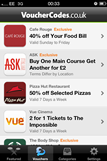 1. VoucherCodes.co.uk. It isn’t the only voucher codes site to have an app, but I’ve found this one to be the easiest to use, with a good range of vouchers and fast load times.
The last time I used it was in Pizza Express, when I took my husband out to lunch as a treat. I told the waiter I had a voucher code on my phone and then, when the bill was brought, he wrote the code down and deducted 20% from the bill. It couldn’t have been more straightforward, and the waiter didn’t bat an eyelid. I love it that voucher codes are so utterly mainstream now.
 2. Kindle Reader for iPhone. Did you know that you don’t have to have a Kindle device to read Kindle books? You can install a free Kindle reader on your iPhone (or your PC, Mac, Android, BlackBerry or iPad, for that matter) from Amazon. You can find further information and download links here.
Thousands of books are available to read on the Kindle for free, either because they are out of copyright or because they are on limited-time promotions, so a Kindle reader effectively places a free library at your disposal. I use the iBooks app as well, but frankly, there are a lot more titles available for Kindle. My well-stocked and gorgeously free digital library includes titles by Jane Austen, the Brontes and Wilkie Collins. I also picked up An Idiot Abroad and The Life of Pi for 20p each. When I’m stuck on a bus, or a friend is late to meet me, I whip my phone out and have a good read.
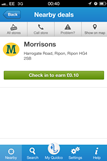 3. Quidco. The cashback site has a phone app that pays you money when you visit high street shops. Purchases are not necessary: instead you get paid simply for walking through the door, whipping out your phone and pressing the apps “check in” button. You can also call up a street map, which pinpoints all the participating stores close to you. The sums involved aren’t big – we’re talking 5p to 30p per shop – but it all adds up. If like me, you can rattle through a town centre, it adds up quickly…
These are the apps that I use most, but there are plenty more of them out there. Miss Thrifty partner Castle Cover has rounded up the best of them in a handy graphic. You can view the interactive version here, and it’s worth a look. It’s billed as a list of money-saving apps for the over-50s, but I think this list is good to go for the rest of us too.

After ploughing through this list I’ve just installed the Cardstar app, which stores all your loyalty cards in one place for ease of access. I shall report back.
In the meantime, if you have a smartphone, what are your favourite money-saving apps? What else have I missed? I am sure there are more than a few…
13 Responses to “My Favourite Money-Saving Phone Apps”
Jill Wilson says:
not exactly an app but a phone related tip! I have just been offered an upgrade on my blackberry, part of which was a new handset. The previous one was about two years old and i have recycled it with http://www.envirofone.com. you just log on, tell them what model your phone is. they tell you how much they will give you, send you a freepost envelope and they either send you a cheque or pay direct to your bank. I received £45 for my old phone, which had been free in the first place. Bargain!
January 24, 2013 at 12:39 pm
Dee says:
o2 Priority Moments app (for o2 customers) offers lots of local deals from free coffee to money off vouchers.
January 24, 2013 at 2:24 pm
Lucy says:
If you’re on O2, then their Priority Moments app is always chock full of useful money saving offers for whilst you’re out and about.
January 24, 2013 at 2:30 pm
Nicki Rayner says:
I have just started using EEA budget planner from the google play store on Android ,it is brilliant and helps me keep a track of what i am spending right at my fingertips.
January 25, 2013 at 7:57 am
Nicki Rayner says:
Sorry that should have read EEBA budget planner!
January 25, 2013 at 7:58 am
Katie says:
Great post as usual! I have a few others I love too:
Budgee – not really a money saving app in the same sense as the others but it certainly helps me to not over spend. It’s a dead simple budgeting tool which allows you to plug in your different budgets for groceries, eating out etc… And every time I spend anything I log it on the app. It’s just a really simple way of keeping track of your spending.
0800 wizard – if you need to call an 0800 number from your mobile which normally costs a fortune, you plug the number into this app and it automatically assigns it a landline number so if your contract is like mine, the call is included in your free minutes
January 25, 2013 at 8:14 am
FoodieClaire says:
Great article. Beg to differ on envirofone. These sites (mazuma, magpie etc) want you to think they are giving you a good price for your phone but they aren’t. You can ALWAYS get more on eBay. Fact. I’ve sold all of my old phones on there. Also no phone is “free”. You pay for it in the form of monthly tariffs. Add that up and compare to price of phone offline….. Ahhh…
January 25, 2013 at 10:25 am
jimmy says:
here’s a great site for bargains too.
http://www.wickedvouchers.co.uk/
I use it a lot. 🙂
January 25, 2013 at 7:36 pm
David says:
You should also try the Money Saving Expert eBay Deals App, you can get some great bagains on the app, and it’s free!
January 28, 2013 at 1:07 pm
Miss Thrifty says:
Great ideas – thanks all. I shall have to report back…
January 30, 2013 at 4:32 pm
James says:
Just like Nicki, I have just started using EEA budget planner from the google play store. I find it great!
February 18, 2013 at 8:57 am
Helen says:
Literally stumbled across this site by googling ‘thrifty tips’ and I’m so glad I did! I’ve already downloaded all three of these apps and you’ve provided some great advice on other posts too! Thank you so much! I’m trying to clear my debts and live a little more frugally so I will definitely be returning again and again! Thank you 😀 xxx
March 26, 2013 at 2:36 pm